UI Elements
Modal Window A flexible popup window
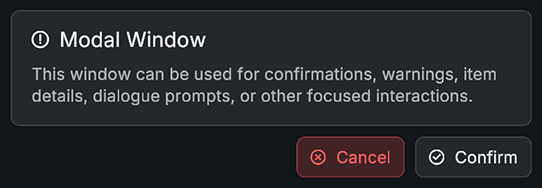
Modal Window displays a popup with a title, description, icon, and confirm or cancel buttons. It supports multiple animation styles, custom content, and navigation options.
The component is ideal for confirmations, warnings, dialogs, item details, or any focused user interaction that requires pausing background UI.
Name Type Description iconSpriteIcon shown at top of modal titlestringTitle text descriptionstringBody description text customContentboolIf enabled, content will not be auto assigned
Name Type Description animationTypeAnimationTypeNone, Fade, Scale, Slide animationDurationfloatDuration of open or close animation animationCurveAnimationCurveEasing curve scaleFromfloatStarting scale when using Scale animation slideOffsetVector2Offset used by Slide animation
Name Type Description useUnscaledTimeboolUse unscaled time for animation closeOnConfirmboolClosing after confirm button is pressed closeOnCancelboolClosing after cancel button is pressed startBehaviorStartBehaviorOpen or Disabled on start closeBehaviorCloseBehaviorDisable or Destroy on final close navigationModeNavigationModeFree or Focused navigation restriction. When set to focused, UI Navigation will be restricted to Confirm and Cancel buttons only.
Name Type Description contentParentRectTransformContainer holding visual content iconImageImageIcon renderer titleTextTextMeshProUGUITitle label descriptionTextTextMeshProUGUIDescription label confirmButtonButtonConfirm button cancelButtonButtonCancel button
Name Type Description onOpenUnityEventCalled after modal opens onCloseUnityEventCalled after modal closes onConfirmUnityEventCalled when confirm button is pressed onCancelUnityEventCalled when cancel button is pressed
Name Parameters Description Open()None Plays open animation and shows modal Close()None Plays close animation and hides or destroys modal SetTitle(text)stringUpdates title text SetDescription(text)stringUpdates description text SetIcon(sprite)SpriteUpdates icon and visibility IsOpenReturns true if modal is currently open
using UnityEngine ; using Evo . UI ; public class ModalWindowExample : MonoBehaviour { public ModalWindow modal ; void Start () { // Update content modal. SetTitle ( "Delete File" ); modal. SetDescription ( "Are you sure you want to delete this file?" ); modal. SetIcon (warningSprite); // Add events modal.onConfirm. AddListener (() => { Debug. Log ( "Confirmed" ); }); modal.onCancel. AddListener (() => { Debug. Log ( "Cancelled" ); }); // Open modal modal. Open (); } public void ShowModal () { modal. Open (); } public void HideModal () { modal. Close (); } }