
UI Elements
List View
A dynamic table component with CSV support
Heads up!
List View is currently in preview. Future updates may introduce major changes.
Overview
List View is a fully dynamic table component that supports flexible columns, dynamic row generation, icons, custom fonts, alternating row colors, borders, and full styling through the ListViewStyle system or Styler Presets.
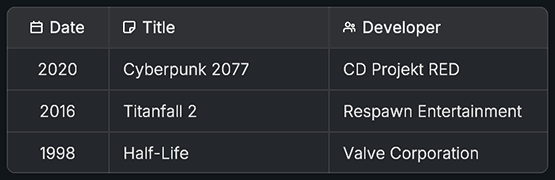
It automatically rebuilds itself when data changes, uses column width calculations based on fixed or flexible sizing, and supports CSV import and export.
CSV Support
List View can:
- Import CSV strings
- Load CSV files
- Automatically build columns from headers
- Update existing rows or replace entirely
- Export all data to CSV format
Properties
Content
| Name | Type | Description |
|---|---|---|
columns | List<ListViewColumn> | Column definitions |
rows | List<ListViewRow> | Row data with values and icons |
Style Settings
| Name | Type | Description |
|---|---|---|
style | ListViewStyle | Controls fonts, colors, spacing, borders |
stylingSource | ListViewStyle.StylingSource | Custom or StylerPreset |
styleMapping | List<ListViewStyle.Mapping> | Maps style fields to styler IDs |
stylerPreset | StylerPreset | Reference used when stylingSource is StylerPreset |
References
| Name | Type | Description |
|---|---|---|
parentRect | RectTransform | If assigned, ListView updates its height based on total content |
Classes
ListViewColumn
| Field | Type | Description |
|---|---|---|
columnName | string | Header label |
columnIcon | Sprite | Optional icon |
width | float | Width when not flexible |
useFlexibleWidth | bool | Distribute remaining space |
alignment | TextAnchor | Alignment for icon and text |
ListViewRow
| Field | Type | Description |
|---|---|---|
values | List<string> | Text values per column |
icons | List<Sprite> | Icons per column |
SetCell(index, value, icon) | Assign value and icon | |
GetIcon(index) | Returns column icon |
ListViewStyle
Contains:
- Fonts
- Font sizes
- Font styles
- Colors
- Backgrounds
- Spacing and padding
- Border settings
- Mapping IDs for Preset styling
- Deep copy utilities
Public Methods
Structure and Data
| Name | Parameters | Description |
|---|---|---|
AddColumn(column) | ListViewColumn | Adds a new column |
RemoveColumn(index) | int | Removes column and trims existing rows |
AddRow(row) | ListViewRow | Adds a row |
AddRow(values) | params string[] | Adds a row from string values |
RemoveRow(index) | int | Removes one row |
ClearRows() | None | Removes all rows |
Cells
| Name | Parameters | Description |
|---|---|---|
SetCellValue(row, col, value) | int, int, string | Updates text |
SetCellData(row, col, value, icon) | int, int, string, Sprite | Updates text and icon |
GetCellValue(row, col) | int, int | Gets text |
Styling
| Name | Parameters | Description |
|---|---|---|
UseAlternatingRowColor(value) | bool | Enables alternating background colors |
Refresh() | None | Updates layout and content |
CSV
| Name | Parameters | Description |
|---|---|---|
ImportFromCSV(csv, hasHeaders, clearExisting) | string, bool, bool | Imports data |
ExportToCSV(includeHeaders) | bool | Returns CSV string |
SaveToCSVFile(path, includeHeaders) | string, bool | Saves CSV file |
LoadFromCSVFile(path, hasHeaders, clearExisting) | string, bool, bool | Loads CSV file |
Code Example
using UnityEngine;
using Evo.UI;

public class ListViewExample : MonoBehaviour
{
    public ListView listView;

    void Start()
    {
        // Add columns
        listView.AddColumn(new ListViewColumn
        {
            columnName = "Name",
            useFlexibleWidth = true,
            alignment = TextAnchor.MiddleLeft
        });

        listView.AddColumn(new ListViewColumn
        {
            columnName = "Age",
            width = 80,
            useFlexibleWidth = false
        });

        // Add rows
        listView.AddRow("Alice", "23");
        listView.AddRow("Bob", "31");

        // Modify a cell
        listView.SetCellValue(1, 1, "32");

        // Import CSV
        string csv = "Name,Score\nPlayer A,120\nPlayer B,95";
        listView.ImportFromCSV(csv);

        // Export CSV
        string exported = listView.ExportToCSV();
        Debug.Log(exported);

        // Refresh manually if needed
        listView.Refresh();
    }
}