
UI Elements
Calendar
A flexible date selection component
Overview
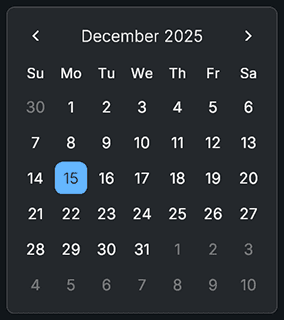
Calendar displays a full monthly view with selectable days, month and year dropdowns, optional Today highlighting, minimum and maximum date limits, and customizable initial date modes. It supports callbacks when a date is selected and exposes several control methods for programmatic navigation.
Properties
Settings
| Name | Type | Description |
|---|---|---|
highlightToday | bool | Highlights today's date if enabled |
yearRangeFromCurrent | int | How many years before and after current year to include in the dropdown |
initialDateMode | InitialDateMode | None, Today, or Custom |
customYear | int | Year used only in Custom mode |
customMonth | int | Month used only in Custom mode |
customDay | int | Day used only in Custom mode |
References
| Name | Type | Description |
|---|---|---|
dateLabel | TMP_Text | Displays the current month and year |
monthDropdown | Dropdown | Dropdown for month selection (optional) |
yearDropdown | Dropdown | Dropdown for year selection (optional) |
previousMonthButton | Button | Navigates to previous month |
nextMonthButton | Button | Navigates to next month |
daysContainer | Transform | Parent for generated day buttons |
dayButtonPrefab | GameObject | Prefab with CalendarDay component |
Events
| Name | Type | Description |
|---|---|---|
onDateSelected | UnityEvent<DateTime> | Triggered when a new date is selected |
Public Methods
| Name | Parameters | Description |
|---|---|---|
GetSelectedDate() | None | Returns the currently selected date (nullable) |
SelectDate(date) | DateTime | Selects a date and updates display |
ClearSelection() | None | Removes selection highlight |
GoToToday() | None | Moves view to today's month |
SelectToday() | None | Selects today's date |
SetMinDate(date) | DateTime | Changes minimum selectable date |
SetMaxDate(date) | DateTime | Changes maximum selectable date |
SetYearRange(range) | int | Rebuilds year dropdown using new range |
Code Example
using UnityEngine;
using Evo.UI;

public class CalendarExample : MonoBehaviour
{
    public Calendar calendar;

    void YourMethod()
    {
        // Listen to selection changes
        calendar.onDateSelected.AddListener(date =>
        {
            Debug.Log("Selected date: " + date.ToShortDateString());
        });

        // Set a custom date
        calendar.SelectDate(new DateTime(2025, 12, 25));

        // Change limits
        calendar.SetMinDate(new System.DateTime(2000, 1, 1));
        calendar.SetMaxDate(new System.DateTime(2050, 12, 31));

        // Go to today
        calendar.GoToToday();

        // Select today
        calendar.SelectToday();
    }
}