
Icons
Browse, manage, and clean UI icons to your project
Overview
Evo UI includes a complete icon set with a growing library of over 345 clean UI icons. These icons can be applied to any Image component, and the Icon Selector tool lets you browse, search, preview, and assign icons instantly.
All icons can be sized up to 256x256. By default, all are imported at 64x64, so if you need a higher resolution, you will need to adjust their texture import settings manually.
Icon Selector
Icon Selector is an editor window that lets you visually browse and assign icons to any selected Image component easily. To use it, select any Image object and open the selector window from Tools -> Evo UI -> Open Icon Selector.
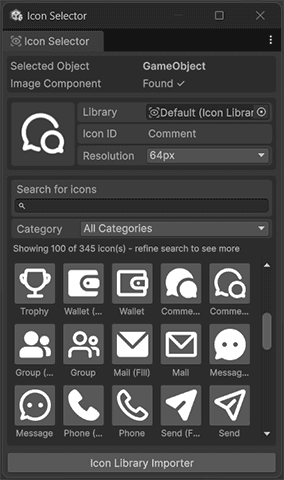
Icons are stored inside an Icon Library asset. You can use the provided icon library, customize it, or create your own.
Icon Library
An Icon Library is a ScriptableObject that stores:
- Icon IDs
- Categories
- A list of resolutions for each icon
- Sprite references for each resolution
To create a new library:
Click to the "+" icon or right click in the Project window
Select Create -> Evo -> UI -> Styler Preset
Start customizing it
Library Importer
This tool allows you to automatically scan folders and generate a full icon library. Importer features:
- Auto category detection from folder names
- Auto ID extraction from file names
- Auto resolution detection from texture size
- Adds new icons or new resolutions to existing ones
- Optional clear library before import