
Procedural Rect
Anti-aliased rounded rectangles rendered via an SDF shader
Overview
Procedural Rect is a custom MaskableGraphic that renders smooth, anti-aliased rounded rectangles using a signed distance field (SDF) shader. It replaces sprite-based UI panels with a fully procedural alternative, supporting fills, outlines, inner shadows, outer shadows, and corner radii — all without any textures.
Color for each layer can be a flat color, a gradient, or inherited from the graphic's base color. Materials and gradient textures are pooled automatically so identical configurations share a single GPU resource.
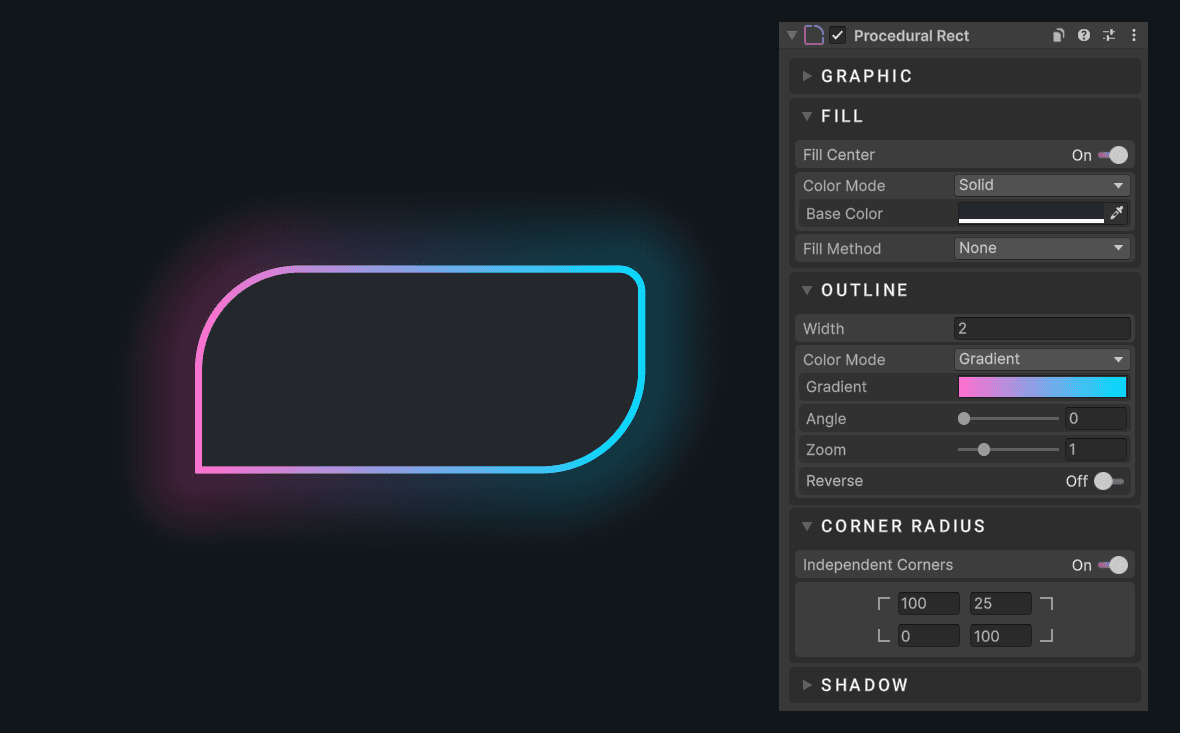
Usage
Add the Procedural Rect component to any UI object
Customize the component to your needs
Fill Center can be disabled to render only an outline or shadow
Notes
- Materials and gradient textures are reference-counted and shared across all
ProceduralRectinstances with identical settings, minimising draw calls and memory usage. - The component requires
TexCoord1,TexCoord2,TexCoord3,Tangent, andNormalcanvas shader channels. These are enabled automatically on the parent Canvas. - The component accepts a source image (sprite) graphic, so it can be used for masking. For example, you can assign a profile picture and increase the corner radius to get a perfect masking with better performance.
Radius Sync
Radius sync lets a child ProceduralRect automatically match the curvature of another rect (typically a parent card or container), so corners nest without any manual radius calculations.
When radiusSyncMode is Match Parent, the component reads the parent's resolved radii. When set to Match Target, it reads from the explicitly assigned radiusSyncTarget. Either way, the child's own cornerRadius field is ignored while sync is active.
The sync math subtracts the child's padding from the outer radius on each corner independently:
R_inner = max(0, R_outer − min(paddingX, paddingY))In the editor, modifying the parent rect's properties triggers UpdateRect() on children automatically, so the nested radii stay live while you tweak values in the Inspector.
Properties
Graphic
| Name | Type | Description |
|---|---|---|
sprite | Sprite | Optional source image rendered inside the rect |
scaleMode | ScaleMode | How the sprite is scaled: Cover, Fit, or Stretch |
raycastMode | RaycastMode | Raycast detection method: None, Standard (rect bounds), or Shape (precise rounded/clipped geometry) |
Fill
| Name | Type | Description |
|---|---|---|
fillCenter | bool | Fill the interior of the shape. Disable to render only the outline |
softness | float | Extra edge feathering in pixels beyond the default 1 px AA band |
fillColorMode | ColorMode | Base, Custom, or Gradient |
fillColor | Color | Solid fill color (used when mode is Custom) |
fillGradient | Gradient | Gradient used when mode is Gradient |
fillGradientAngle | float | Rotation of the gradient in degrees (0–360) |
fillGradientZoom | float | Zoom factor — values above 1 compress the gradient, below 1 stretch it |
fillGradientReverse | bool | Swap the gradient start and end colors |
Outline
| Name | Type | Description |
|---|---|---|
outlineWidth | float | Width in pixels, drawn inward from the shape edge |
outlineColorMode | ColorMode | Base, Custom, or Gradient |
outlineColor | Color | Solid outline color |
outlineGradient | Gradient | Gradient used when mode is Gradient |
outlineGradientAngle | float | Rotation of the gradient in degrees |
outlineGradientZoom | float | Zoom factor for the gradient |
outlineGradientReverse | bool | Swap the gradient start and end colors |
Corner Radius
| Name | Type | Description |
|---|---|---|
radiusMode | RadiusMode | Pixels or Percentage (percentage of half the shortest side) |
independentCorners | bool | Allow each corner to have a different radius |
squircleCorners | bool | Use smooth squircle corners instead of standard circular rounding |
cornerRadius | Vector4 | Radii for all four corners: X = Top Left, Y = Top Right, Z = Bottom Right, W = Bottom Left |
radiusSyncMode | RadiusSyncMode | Automatically derives corner radii to fit snugly inside another rect: None, MatchParent, or MatchTarget |
radiusSyncTarget | ProceduralRect | The target rect used when radiusSyncMode is set to MatchTarget |
Clipping
| Name | Type | Description |
|---|---|---|
clipMethod | ClipMethod | None, Horizontal, Vertical, or Radial360 |
clipOrigin | int | Edge or quadrant from which clipping begins (range depends on method) |
clipAmount | float | How much of the shape is visible (0–1) |
clipClockwise | bool | Direction of the radial clip sweep |
Inner Shadow
| Name | Type | Description |
|---|---|---|
innerShadowOffset | Vector2 | Pixel offset of the inner shadow |
innerShadowSize | float | Expansion or contraction size |
innerShadowSoftness | float | Blur radius of the inner shadow |
innerShadowColorMode | ColorMode | Base, Custom, or Gradient |
innerShadowColor | Color | Solid inner shadow color |
innerShadowGradient | Gradient | Gradient used when mode is Gradient |
innerShadowGradientAngle | float | Rotation of the gradient in degrees |
innerShadowGradientZoom | float | Zoom factor for the gradient |
innerShadowGradientReverse | bool | Swap the gradient start and end colors |
Outer Shadow
| Name | Type | Description |
|---|---|---|
outerShadowOffset | Vector2 | Pixel offset of the outer shadow |
outerShadowSize | float | Expansion or contraction size |
outerShadowSoftness | float | Blur radius of the outer shadow |
outerShadowColorMode | ColorMode | Base, Custom, or Gradient |
outerShadowColor | Color | Solid outer shadow color |
outerShadowGradient | Gradient | Gradient used when mode is Gradient |
outerShadowGradientAngle | float | Rotation of the gradient in degrees |
outerShadowGradientZoom | float | Zoom factor for the gradient |
outerShadowGradientReverse | bool | Swap the gradient start and end colors |
Enums
Scale Mode
| Value | Description |
|---|---|
Cover | Fills the rect, cropping the sprite if needed |
Fit | Preserves aspect ratio, leaving gaps if needed |
Stretch | Ignores aspect ratio and fills the rect exactly |
Raycast Mode
| Value | Description |
|---|---|
None | Disables raycasting entirely |
Standard | Uses the rect bounds for hit detection |
Shape | Uses the precise rounded and clipped geometry for hit detection |
Clip Method
| Value | Description |
|---|---|
None | No clipping applied |
Horizontal | Clips from the left or right edge |
Vertical | Clips from the top or bottom edge |
Radial360 | Sweeps a radial clip around the full 360° |
Color Mode
| Value | Description |
|---|---|
Base | Inherits from the graphic's color property |
Custom | Uses the dedicated solid color field |
Gradient | Samples from a baked gradient texture |
Radius Mode
| Value | Description |
|---|---|
Pixels | Corner radius is expressed in screen pixels |
Percentage | Corner radius is a percentage (0–100) of half the shortest rect side |
Radius Sync Mode
| Value | Description |
|---|---|
None | No syncing — corner radii are set manually |
MatchParent | Derives radii to fit snugly inside the parent ProceduralRect |
MatchTarget | Derives radii to fit snugly inside the assigned radiusSyncTarget |
Public Methods
| Method | Description |
|---|---|
UpdateRect() | Marks vertices and material dirty. Call after modifying public fields via code |
SetSprite(Sprite) | Sets the sprite and triggers a full dirty if it changed |
SetCornerRadius(Vector4) | Sets per-corner radii and marks vertices dirty |
SetCornerRadius(float) | Sets a uniform radius on all four corners |
GetRadiiPixels(Rect) | Returns the resolved pixel radii for the given rect, accounting for sync and radius mode |
Code Example
using UnityEngine;
using Evo.UI;

public class ProceduralRectExample : MonoBehaviour
{
    public ProceduralRect rect;

    void Start()
    {
        // Set a sprite
        rect.sprite = mySprite;

        // Rounded card with a white fill
        rect.fillColorMode = ProceduralRect.ColorMode.Custom;
        rect.fillColor = Color.white;
        rect.cornerRadius = new Vector4(16, 16, 16, 16);

        // Subtle drop shadow
        rect.outerShadowOffset = new Vector2(0, -4);
        rect.outerShadowSoftness = 12f;
        rect.outerShadowColor = new Color(0, 0, 0, 0.25f);

        // Thin outline
        rect.outlineWidth = 1f;
        rect.outlineColorMode = ProceduralRect.ColorMode.Custom;
        rect.outlineColor = new Color(0, 0, 0, 0.1f);

        // Reveal the shape with a radial wipe
        rect.clipMethod = ProceduralRect.ClipMethod.Radial360;
        rect.clipAmount = 0.75f;

        // Update the rect to apply some changes that require vertices or material to be updated
        rect.UpdateRect();
    }
}