
Quick Start
Get Evo Loader set up and trigger your first scene load
Compatibility
Fully compatible with:
✅ Unity 6 (6000.x)
Not supported:
🟥 Unity 2022.2 and earlier
✅ All platforms
✅ Input System (New)
✅ Input Manager (Old)
✅ Built-in
✅ URP
✅ HDRP
Triggering a Load
Add Your Scene to Build Profiles
Make sure the target scene is added to the Build Profile. Evo Loader uses Unity's SceneManager under the hood and will log an error if the scene cannot be found.
From Inspector / UI
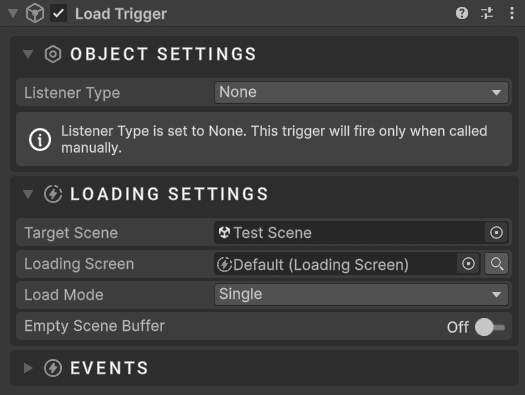
Add a Load Trigger component to any GameObject and configure your load parameters directly in the Inspector. No code required.
Add the Load Trigger component to a GameObject
Set the Listener Type to match how you want the load to be triggered
Fill in the Load Parameters section — target scene, loader prefab, load mode, and events
Hit Play — the load fires automatically based on the chosen listener
See the Load Trigger page for more details.
From Code
The simplest way to trigger a load is a single static call:
using Evo.Loader;

// Load with a specific loader prefab assigned in the Inspector
LoadingScreen.LoadScene("GameScene", myLoaderPrefab);

// Load without a prefab reference
// Uses the default screen from the config asset (Evo Loader/Resources/EvoDefaultConfig.asset)
LoadingScreen.LoadScene("MainMenu");

// Load additively
LoadingScreen.LoadSceneAdditive("UIOverlay");

// Show a loading screen without loading any scene (for transitions or splash screens)
LoadingScreen.ShowTransition();
For more control, you can use LoadParameters:
using UnityEngine;
using Evo.Loader;

public class MyLoader : MonoBehaviour
{
    public LoadingScreen loaderPrefab;

    public void GoToGameScene()
    {
        LoadParameters parameters = new()
        {
            targetScene = "GameScene",
            loadingScreen = loaderPrefab,
            loadMode = LoadMode.Single,
            useEmptySceneBuffer = true
        };

        parameters.onLoadStart.AddListener(() => Debug.Log("Load started!"));
        parameters.onLoadComplete.AddListener(() => Debug.Log("Load complete!"));

        LoadingScreen.LoadScene(parameters);
    }
}
See the Loading Screen page for more details.
Load Modes
| Mode | Description |
|---|---|
Single | Classic scene swap. The current scene is replaced by the target scene. |
Additive | The target scene is loaded alongside the current scene. |
TransitionOnly | Shows the loading screen without loading any scene. Useful for custom transitions or splash screens. |
Loading Screen Prefabs
Below are ready-to-use prefabs that offer different styles for different purposes. You can modify or duplicate them, or use them as-is.
- Default: Recommended preset. Feature-rich and designed to be flexible.
- Bold: Full-caps, bold-styled fonts paired with rectangles. Uses a custom transition.
- Fast: Offers fast yet smooth loading. No visible elements — only a black screen.
- Futuristic: Sci-fi-inspired visuals with minor tweaks.
- Kawaii: Soft, cute visuals with a charming aesthetic. Uses a custom transition.
- Logo Fill: Features a logo with a fill animation based on loading progress. No title or description.
- Simple: A toned-down version of the Default preset. No hints, title, or description.
Explore Further
Loading Screen
Properties, events, tasks, and the full loading lifecycle
Load Trigger
Inspector-driven loader presets with runtime listeners
Background Database
Manage cycling background images
Hint Database
Manage cycling tips and hint entries